Changing the Language
By default, the dialog language is English.
To pick another available language, click on the language selector flag in the upper-right corner of the screen:
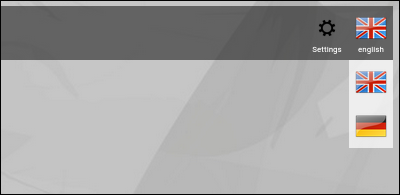
(Zingoolarity language selector screen)
By default, English and German are available.
<>P>Switching to a different language is instantaneous (no restart required).
Languages can be added by software engineers who are able to read and add to the Go source code of Zingoolarity.
Adding a new language
(No need to read on for normal users)
Translations are stored in modules with the naming scheme lang_english.go or lang_german.go and can be handed over to native speakers for professional translation.
The new translation can be added as a new file with the same scheme, for example lang_polish.go.
Finally the new language key (in this example polish) has to be added to the two functions availableLang() and loadLang() in the module helper_lang.go to make it available.
Add the new module lang_polish.go to build.sh and compile zingoolarity with a call to ./build.sh at the command line to create a new Zingoolarity executable, which contains the new language.
You should also add a new icon file to the asset directory, which is called polish.png and represents the national flag shown in the language selection menu. | 




