|
|---|
 |
 |
|---|
 |
|---|
 |
|---|
|
|
|---|
 | Zingoolarity Homepage | | TOPICS | | Summary Report |
| Summary Report |
|---|
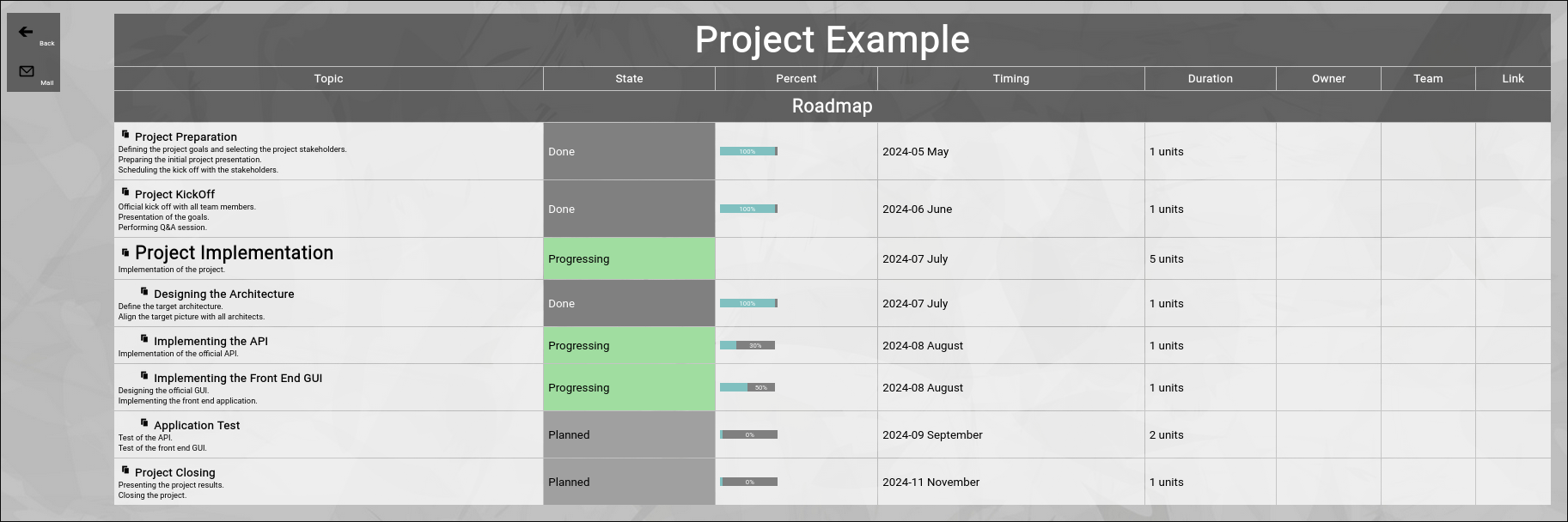
Summary ReportThe "Summary Report” function can be invoked by clicking on the "Summary” button in the topic editor screen. It will render a simplified summary of a topic tree, including the actions, which were used to document the progress. In that, it will strictly follow the hierarchy of the topics and will only render the level of topics below, if the topic has been opened. The sorting is similar to the sorting of the roadmap view mode. Here is a very simple (artificial) example, shown in Roadmap view mode:
The example basically represents a small project, starting in May 2024 and ending in November 2024. It will produce the following view, when the "Summary” button is clicked:
You can use such a view to present a structured status report in a meeting. By default, all actions are rendered in the summary report. You can use the filter bar in the screen before invoking the summary to set a starting date, so that only actions since a given date are included in the summary report. "Back” buttonYou can click the "Back” button to return to the previous screen. "Mail” buttonYou can click the "Mail” button to send the summary report to your own email account (formatted as an HTML email). From there you can forward it as an "offline status report” to any number of people. |