Using Personal Bookmarks
The "Bookmark” function can be invoked from the breadcrumb (which is present in all of the three view modes) for the currently focused topic by clicking on the "Bookmark” button.

(Zingoolarity breadcrumb with bookmark button)
The currently focused topic will be added to your personal bookmarks for later quick pick.
This is for example helpful if you have a couple of projects (or similar) or you have created a personal workspace with a ToDo list, which are all spread over different levels and different branches of the topic hierarchy tree.
If you bookmark the currently focused topic, the button will change into the "Unbookmark” button, which (as the name implies) allows you to directly unbookmark the currently focused topic again.
To pick a topic from your personal bookmark list, invoke the "Bookmarks” from either the main menu or from the home page:
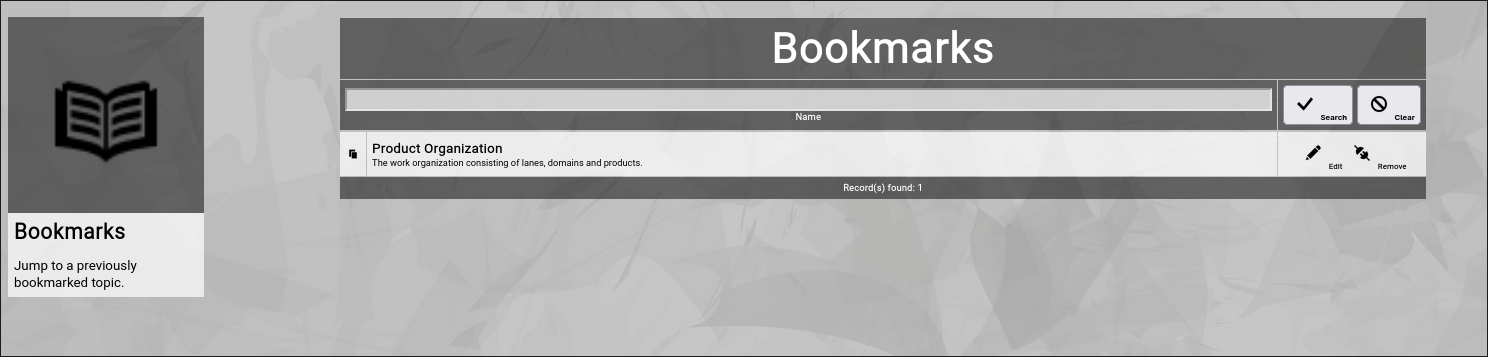
(Zingoolarity personal bookmarks screen)
In this screen you have multiple options:
- Filter the list of bookmarks by part of their topic names.
Enter part of the name of a bookmarked topic and click the "Search” button.
To remove the filter again, click the "Clear” button.
This is helpful if you have already bookmarked many topics.
- Focus on the bookmarked topic.
Click on the name of the topic (in the left part of the list) to switch to the Contextchart view of the topic.
This is the main purpose of the bookmarks screen.
- Directly edit a topic.
Click on the "Edit” button right of one of the bookmarked topics.
This will invoked the topic editor screen (and will return to the bookmarks screen when you are finished).
- Directly remove a bookmark (= "unbookmark” the topic).
Click on the "Remove” button right of one of the bookmarked topics.
As this is not a critical "delete” operation, the bookmark will be removed without further confirmation.
| 




